Thursday, 2 September 2021

Consolidate Data Cells From New Excel Multiple Worksheets

Consolidate Data Cells From New Excel Multiple Worksheets

Combine multiple sheets or workbooks into one workbook After free installing Kutools for Excel please do as below. Click the Blank Query option.


Consolidate Data From Multiple Worksheets In A Single Worksheet In Excel

In the Get Transform Data group click on the Get Data option.
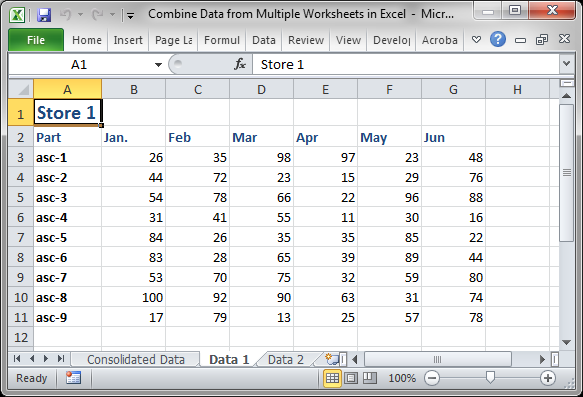
Consolidate data cells from new excel multiple worksheets. You can also type the reference to the cell range in yourself if youd prefer. This is the list of all the available functions in the Consolidate tool. Select cell C5 in the summary worksheet and from the Data menu click Consolidate.

Using a macro to combine multiple Excel files into one. Go to the Data tab. When we have multiple Excel files we can merge them in a swift manner using a.

Query Editor in Excel. Once we click on Consolidate the below window will appear. Now go to Data Tab Data Tools Consolidate.

You can combine data from multiple cells into a single cell using the Ampersand symbol or the CONCAT function. In the Consolidate window make sure that Sum is selected in the Function drop-down menu. Use Power Query Use consolidate feature Use a macro VBA DataCleansingctt How to combine data from multiple worksheets using Power Query.

Also when adding a new sheet enter data correctly across the cells. Here are the steps to combine multiple worksheets with Excel Tables using Power Query. Where we want the Consolidate function to insert the data from other sheets.

For Each ws In wbWorksheets except the master sheet from looping If wsName Master Then wsActivate lastRow CellsRowsCount startColEndxlUpRow lastCol CellsstartRow ColumnsCountEndxlToLeftColumn get data from each worksheet and copy it into Master sheet RangeCellsstartRow startCol CellslastRow lastColCopy _ mtrRangeA. We will click OK. This will open the Power Query editor.

We will now click on cell B3. Combine data with the Ampersand symbol Select the cell where you want to put the combined data. Loop through each WorkSheet in the workbook and copy the data to the Consolidate_Data WorkSheet For Each Sht In ActiveWorkbookWorksheets If ShtName DstShtName Then 51.

As we can see above cell B3 is selected and now we will move up to the Data tab in Excel Ribbon and will go to Consolidate. Now here are the steps you need to follow to consolidate data from these multiple tabs. In the master worksheet click the upper-left cell where you want the consolidated data to appear go to the Data tab and click Consolidate.

You can use SUM AVERAGE COUNT MAX MIN function in excel etc. If a worksheet containing data that you need to consolidate is in another workbook click Browse to locate that workbook. Activate Excel click Kutools Plus Combine a dialog pops out to remind you the workbooks you want to combine needed be closed.

Find the last row on the Consolidate_Data sheet DstRow fn_LastRowDstSht 1 52. If for example stock purchased is located in a certain cell on sheet 1 it is necessary to place it in the same cell on all the other sheets. Click the worksheet that contains the data you want to consolidate select the data and then click the Expand Dialog button on the right to return to the Consolidate dialog.

In a new sheet of the workbook which you want to collect data from sheets click Data Consolidate. Collect data from multiple sheets into one with Consolidate function. When you plan to consolidate data from multiple sheets into one make sure its consistent in cell number.

Ctt template3 link434Ib viano Learn 3 ways to combine data from multiple worksheets. Type and select the first cell you want to combine. Figure 14 How to combine multiple excel files into one worksheet.

If you want to collect data from multiple sheets into one sheet in the same workbook you can apply the Consolidate function in Excel. Set the Data Source and Base Function When you click the Consolidate command in step 2 above the Consolidate dialog box pops up allowing you to specify what data you want to summarize. Go the From Other Sources option.

Just below the Data tab click on New Query then choose From Other Sources in options. Power Query is a powerful way to combine data from multiple sheets into a master list for further analysis. Find Input data range LstRow fn_LastRowSht LstCol fn_LastColumnSht EnRange ShtCellsLstRow.

This is the beauty of the consolidate. Click on the Data tab. Click the button next to the Reference entry box to begin selecting your first data setthis is the data you wish to merge.

Run Excel Consolidate. Figure 13 Combine excel files into one. You will then be able to import data from various other sources.

First of all insert a new worksheet and name it Total or whatever you want and select cell A1 in that worksheet. Just follow the step by step guide below to successfully combine data from various worksheets. This is where we need to select the ranges of different sheets to consolidate the data to a single sheet.

In the Import Data dialog box we will select Table and New Worksheet option. In your new worksheet press Data Consolidate.

Wednesday, 1 September 2021

Combine Data From Multiple Worksheets Into One Vba

Combine Data From Multiple Worksheets Into One Vba

From every worksheet in the ActiveWorkbook to this worksheet. Paste the code into the code window at right.


Pin On Excel Dashboard Templates

Go to the Data tab.

Combine data from multiple worksheets into one vba. When we have multiple Excel files we can merge them in a swift manner using a VBA macro. Activate Excel click Kutools Plus Combine a dialog pops out to remind you the workbooks you want to combine needed be closed. Click Insert Module and copy and paste below code to the Module script.

If you are a power Excel user and feel comfortable with macros and VBA you can combine multiple Excel sheets into one by using some VBA script for example this one. Insert a module in VBA editor and copy above VBA code. In my data folder I have two files as you can see in the below screenshot.

From the menu choose Insert-Module. We can easily use the macro displayed below. Combine and Append data from multiple Excel workbooks into one worksheet.

Select the heading and hit OK. This tutorial will show you how to combine multiple Excel files into one workbook in VBA. This function searches for a certain value in a column so that it could return a value from a different column in the same row.

You will be asked to select headings. VBA Combine Multiple Workbooks. Consolidate data from multiple Worksheets into a single sheet By Row using VBAProject Objective.

Here is a VBA code can collect data from all sheets in a new sheet in the current workbook. Here are the steps to combine multiple worksheets with Excel Tables using Power Query. Creating a single workbook from a number of workbook using VBA requires a number of steps to be followed.

More on VBA Workbooks. One of the ways in which we can combine the data from multiple sheets in the Excel VLOOKUP function. Steps to Combine Excel Files using VBA.

Step 1 Setup Step 2 Exploration Step 3 Execution Step 4 Cleanup. Rename it later if you want. Lets review the code using our 4-step VBA process as a guide.

You need to select or create the workbook to which you wish to put the data the Destination file. Combine Multiple Worksheets into One. And it is done.

Now If I ask you to prepare a final master file which will be a combination of all the files and all the sheets Merge Data. Save the file and close the VBE. In the Combine Worksheets step 1 dialog check Combine multiple worksheets from workbooks into one workbook option.

Learn how to Combine Data From Multiple Sheets Tabs in Microsoft Excel using Power Query auto expandable Table Objects and make an automatic master sheet. Lets Start how to merge data in VBA Worksheets. Step 1 Setup takes place from lines 11-13 where we make three assignments.

Merge cells from all or some worksheets into one Master sheet. VBA to concatenate the data in multiple Worksheets to a newly created Worksheet in the same workbook. To combine multiple Excel workbooks you need to use a code that can either let you choose the files that you want to combine or you can refer to a particular path location and combine all Excel files there in the current workbook.

Click the Blank Query option. The ranges in all worksheets are concatenated into the consolidated Worksheetfinal Worksheet one after another in rows wise. Go the From Other Sources option.

Each time you run one of the examples it. Click Next to go to next step of wizard. Making you clearer on this.

Insert a new sheet and name it Master in the workbook. Please keep in mind that for the VBA code to work correctly all of the source worksheets must have the same structure the same column headings and same column order. WksDst the Import Worksheet.

In the Get Transform Data group click on the Get Data option. You need to select the workbooks from which you want the source data the Source files. Will first delete the summary worksheet named RDBMergeSheet if it exists and then.

Below I found a VBA Script online that takes all worksheets from workbooks in a directory and combines them all in one workbook as separate sheets. This tutorial walks you through a VBA solution for combining data from multiple Sheets with out of order different columns into a single Sheet. We have 3 different Excel files.

2 files are to xlsx and one file is to xlsm in a folder. VBA Code to copy data from multiple worksheets and paste into single Combined worksheet. Open the workbook that contains worksheets you want to combine.

Hit AltF11 to open the Visual Basic Editor VBE. Hit Tools-Macro-Macros and double-click CopyFromWorksheets. Picture 1 When I open a file I get 3 sheets like 1 2 and 3.

However I dont want them to be separate sheets. Combine Multiple Worksheets with Vlookup. LngDstLastRow the last-occupied row on the Import Worksheet.

It has several parameters. All the sheets are merged in master. Using a macro to combine multiple Excel files into one.

We will click on Alt F11 and select Visual Basic Editor. Click OK to continue. Collect all data from sheets into one.

This will open the Power Query editor. The examples will add a worksheet with the name RDBMergeSheet to your workbook and will copy cells. Collect data from multiple sheets into one with VBA code.

Press Alt F11 key to enable the Microsoft Visual Basic for Applications window. Lets understand with a simple exercise how to merge spread sheet through VBA in Microsoft Excel. The value that we are looking for.

In this article we are going to learn how to assemble the data from different workbooks through VBA in Microsoft Excel.